
New·AI receipt scanning, now on iOS

The job’s real number,
while it’s still open.

Every clocked hour and photographed receipt costs straight to the job. So a job going sideways shows up in week two — not in the close-out meeting.

No credit cardiOS app includedEspañolCancel anytime
$8/mo
for up to 10 workers
1 week
free, no card
Solutions

Solve the three things
that eat a job’s margin

SiteLedger is job costing and time tracking for contractors — one place where labour, materials and receipts land against the job that spent them.

Most contractors get a job’s real number weeks after the crew has moved on: hours off a paper timesheet, receipts out of the glovebox, a supplier invoice that arrives at month end. By the time it adds up, the job is closed and the margin is whatever it turned out to be.

Costing every hour and every receipt the day it happens changes that. Time tracking is geofenced, so hours attach to the job the crew is standing on, and receipts are photographed at the counter and read automatically. What you get back is the job’s real number while it’s still open — early enough to move a crew, re-price a change order, or call the supplier before the loss is locked in.

You find out too late

A job that went wrong in week two shows up in the close-out meeting. Costs post the day they happen instead.

Receipts vanish

The pile in the truck, the one in the wash, the one nobody coded. Photographed at the counter, costed to the job.

Hours are guesswork

Geofenced clock-ins from the slab, approved a week at a time, with overtime flagged before payroll runs.

A contractor in an orange hard hat checking his phone inside a timber-framed house at sunset
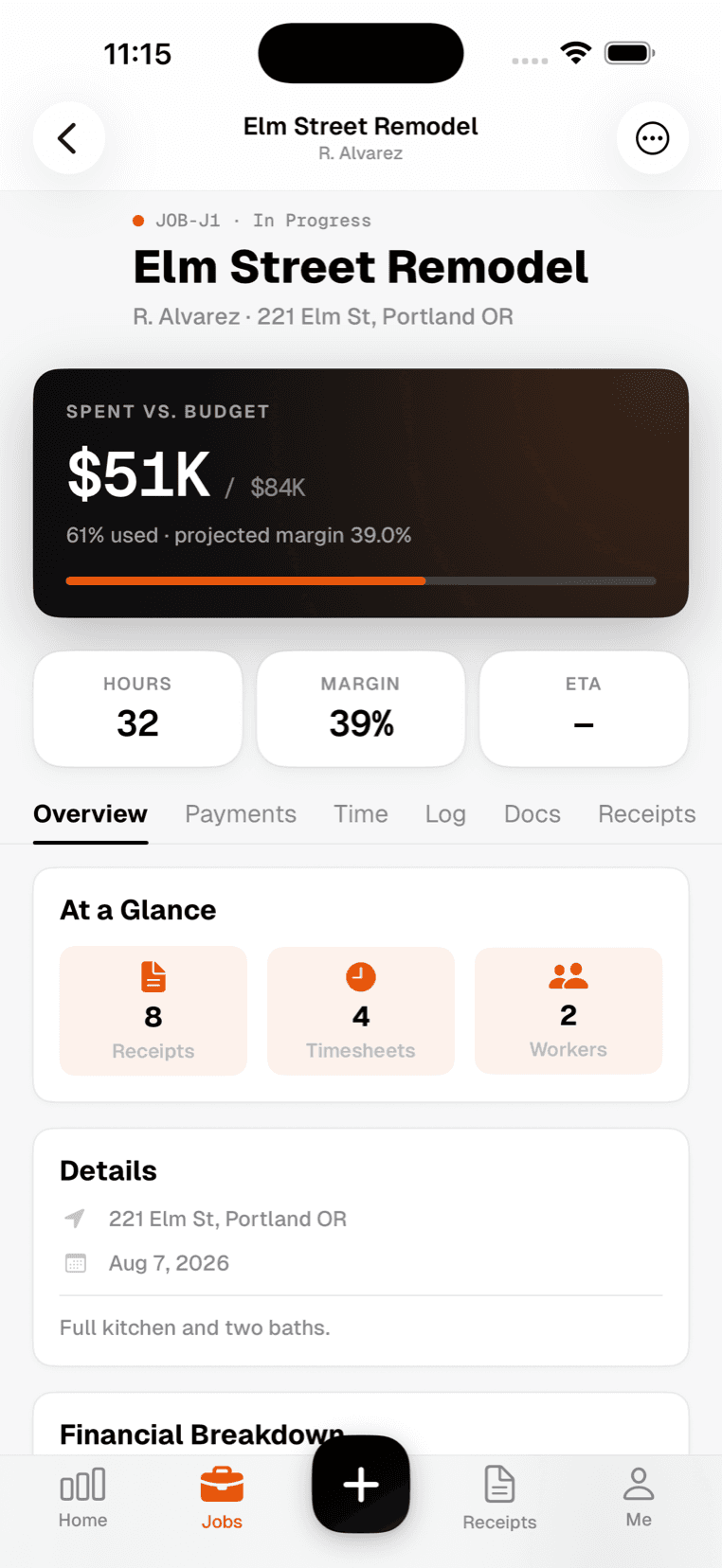
SiteLedger on iPhone: a single job showing spent against budget, percentage used, projected margin and hours logged
Spent vs. budgetUpdated as it happens
MarginWhile the job is still open
See it by trade

The product

Built around the one question that matters.

Not “what did we spend” — anyone can tell you that in March. What is this job going to make, today.

Margin, live, per job

Labour and materials post as they happen. You see the job slipping while there is still budget left to manage.

Maple Ridge Reno62% of budget
Highland Tower 4F91% of budget
1422 Oak St34% of budget
Highland Tower is 6 points from going under. In week two.
Receipts, at the counter

Before it goes through the wash.

1Photo at the counter
2Vendor + total read
3Costed to the job
4 seconds · works with no signal

Clock in from the slab

Geofenced, so the hours are where the work was.

The crew, not a spreadsheet

Approve a week at a time, overtime flagged before payroll.

Daily logs that hold up

Weather, who was on site, photos. Two minutes from the truck.

Straight to QuickBooks

Plus Google Drive and Slack. CSV for everything else.

Start with one job

Not your whole history. One live job and this week’s receipts is enough to see something by Friday.

Start free — 1 week
iOS app

The numbers start
on the job site

Your crew is not going to open a laptop. They will open a phone with one thumb, standing on a slab, in the sun.

Clock in and out at the job, with the location attached
Photograph a receipt and the AI reads the vendor, total and tax
Spent against budget on every job, updated as the crew spends it
Works with no signal — everything syncs when the truck hits coverage
Spanish throughout, so the whole crew can use it
Am I making money on this one?
Spent vs. budget, and the margin it lands at.
Who owes me?
Invoiced, paid, and what is still outstanding.
Where did it go?
Every receipt, filed to a job, searchable by vendor.
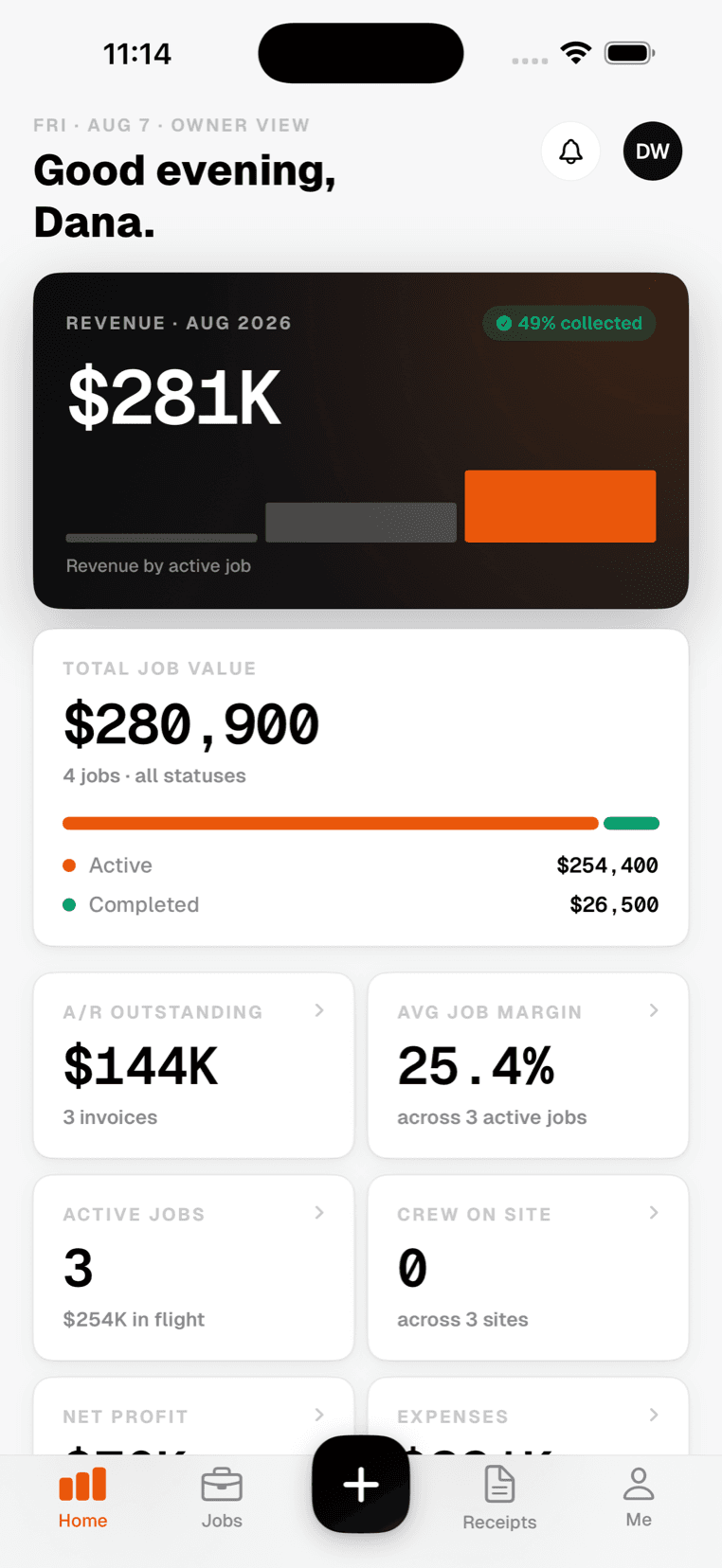
SiteLedger on iPhone: the owner's home screen, showing revenue this year, the value of the book of work, average margin and the balance still owed.
SiteLedger on iPhone: a single job, showing spent against budget, the percentage of the budget used, the projected margin, and hours logged.

And what the crew sees

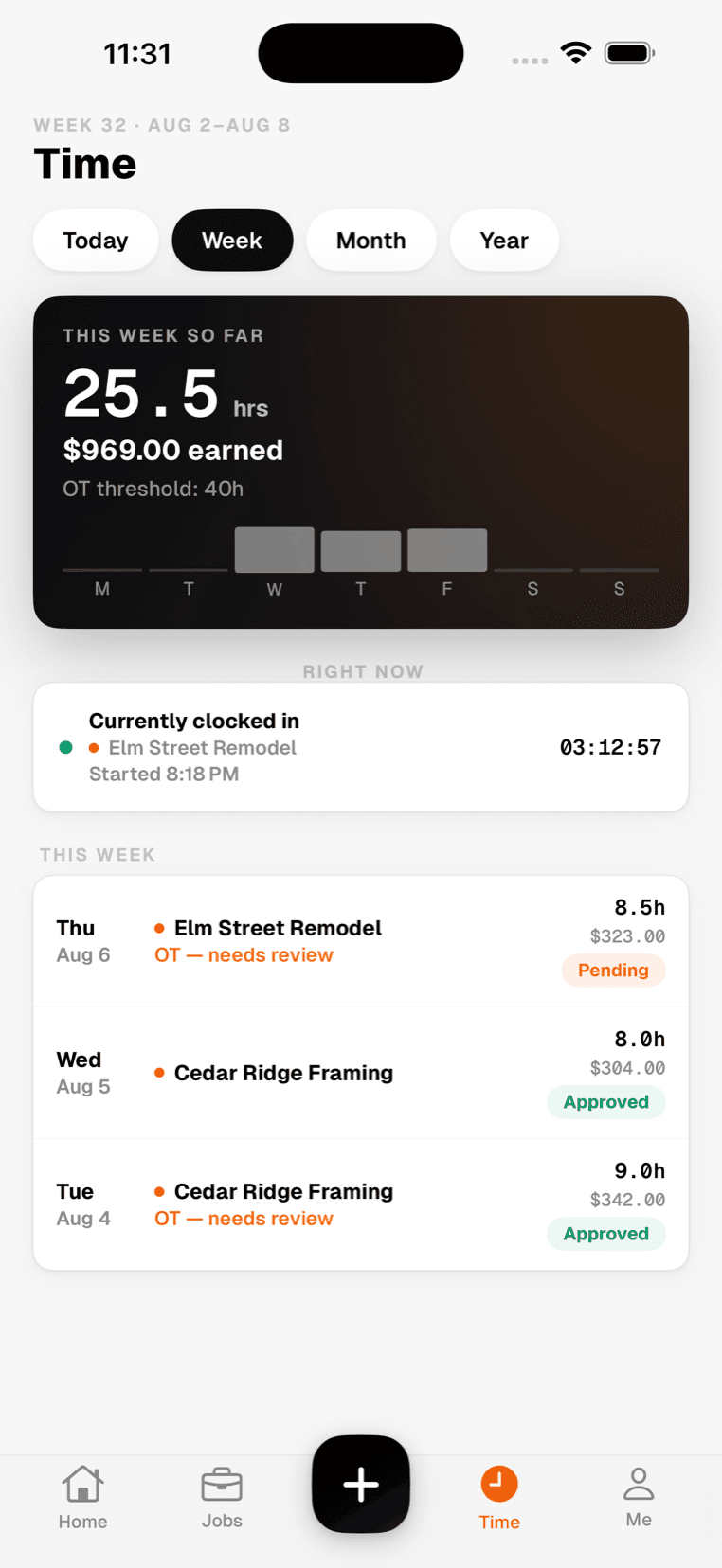
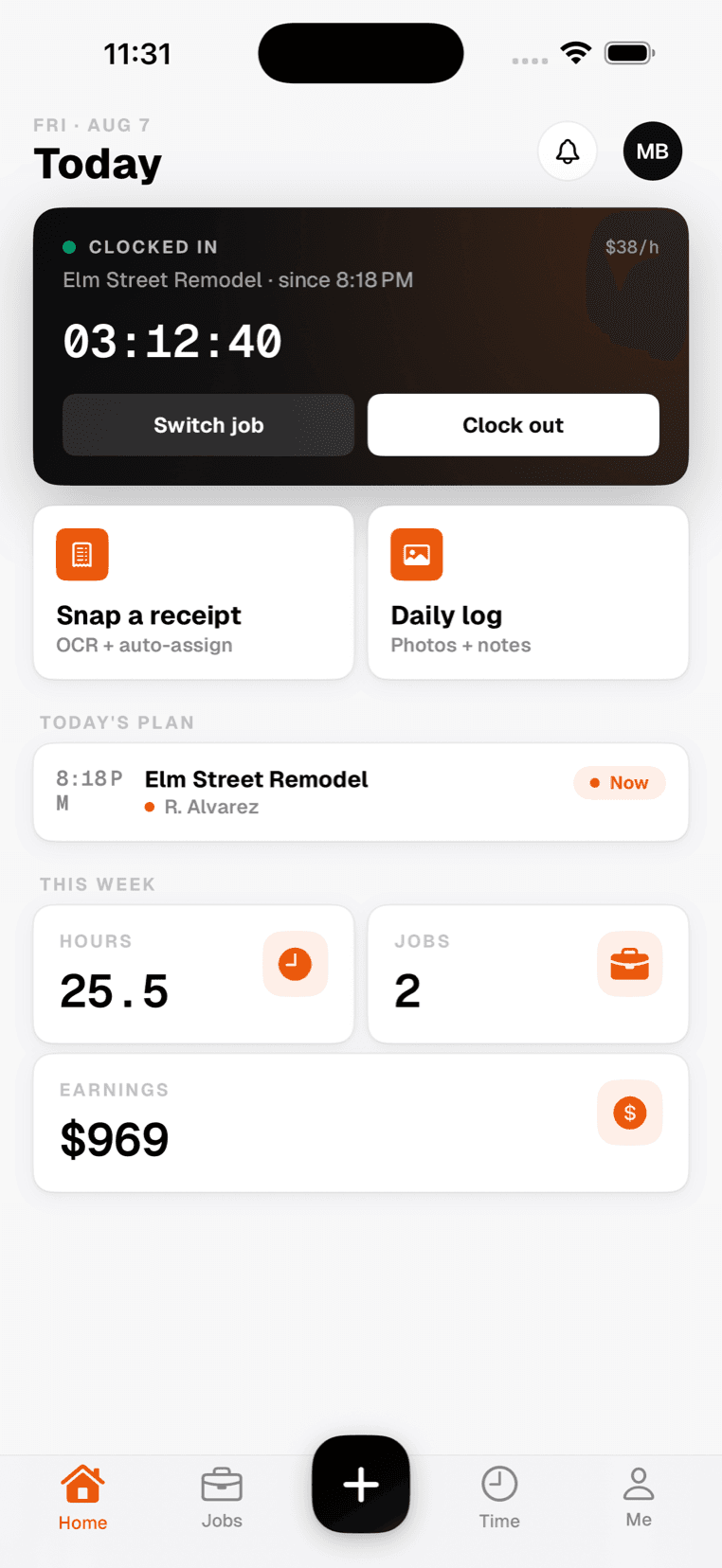
Their jobs, their hours, their pay. No margins, no contract values, no client balances — a worker cannot see what the job is worth, and the screen says so.

SiteLedger on iPhone, signed in as a crew member: clocked in to a job with a running timer, their hourly rate, and shortcuts to snap a receipt or file a daily log.
SiteLedger on iPhone, signed in as a crew member: hours and earnings for the week, the shift still running, and each day's entry marked approved or pending.

How it works

Three steps. No spreadsheet.

The whole point is that nobody has to do data entry at the end of the week.

Construction drawings weighted down on a site table with a tape measure, hand tools and a coffee cup
01

Price the job

Put in the contract value and your labour rates once. Every hour and every receipt from then on is measured against it.

An electrician in an orange hard hat wiring an outlet box in a partly framed wall, coils of cable over one shoulder
02

Work the job

The crew clocks in on site and photographs receipts as they get them. It works offline and syncs when the signal comes back.

A work-gloved hand holding a lumber yard receipt over a workbench, stacked timber behind
03

See where the money went

Labour and materials post against the job as they happen — so you find out you are over budget while you can still do something about it.

A construction crew in orange hard hats gathered around a foreman holding a tablet on a concrete slab, timber framing rising behind them

Built for the field

Your crew is not sitting at a desk.

SiteLedger works with gloves on, one-handed, in the sun — and keeps working when the signal drops.

  • Clock in from the slab, not the trailer
  • Snap a receipt before it goes through the wash
  • Costs land against the job the moment they happen
See how it works
A worker in an orange hard hat and high-visibility vest checking a phone at the edge of a job site
Live on the job site
Diego R. · framing crew lead
9:41●●●● ▲
Wednesday, Mar 26
Today
Clocked in
04:23:18
Maple Ridge Reno · started 8:14 AM
Snap receipt
Add to job
Recent
Home Depot
$284.50 · Lumber
9:32
Diego clocked in
Maple Ridge
8:14
For the field

Built for the truck,
not the office.

Crews don't carry laptops. SiteLedger works one-handed, glove-friendly, and offline-first — so the data gets captured the moment it happens.

<3s
Receipt to ledger
Offline
Works without signal
1-tap
Clock in & out
0
Lost paper sheets
See the iOS app
Integrations

Connects to what you
already run the business on

Three live integrations, and a CSV export for everything else.

QuickBooks Online

Jobs, expenses and invoices push straight into your books.

Live

Google Drive

Receipt images and documents back up to a folder per job.

Live

Slack

Receipts, clock-ins and job updates post to a channel.

Live

Need something else? Tell us what you use

A residential construction site at the end of the day, two houses in timber frame with a crew packing up and a stack of lumber in the foreground
Made by people who've been on the job

Every screen was built standing on a job site, not in a conference room.

Half our team has held a clipboard and a level. We test on roof tops, scaffolds, and concrete pours — not in QA labs.

Customers

Contractors who stopped
guessing at the number

Three of them, in their own words.

“SiteLedger transformed our entire operation. The geofence tracking eliminated time theft, and the receipt OCR saved us 12 hours per week. We’ve seen a 22% increase in profit margins since switching.”
+22%
Profit margin
12 hrs
Saved per week
Zia NawazOwner & General Contractor · Eiffel Builders
A residential construction site at the end of the day, two houses in timber frame and a crew packing upLive on the job site
“As a small business owner, I was drowning in paperwork. SiteLedger cut our admin time by 15 hours a week. Now I can focus on growing the business instead of managing spreadsheets.”
15 hrs
Admin saved / week
0
Spreadsheets left
Sarah MitchellOwner · Erecto Construction
“The AI insights are incredible. It flagged a subcontractor who was consistently over budget before it became a major problem. This one feature alone saved us over $25,000 on our last project.”
$25K
Saved on one project
AI
Budget alerts
David HarrisonGeneral Contractor · Brixo Contractors
Read the full stories
Pricing

Simple, transparent pricing.

Free trial for 1 week on every plan. No credit card required. Cancel anytime.

Starter

For a small crew getting off spreadsheets.

$8/month
After your 1 week free trial
Start free trial
Up to 10 workers
Unlimited jobs
AI receipt scanning
Geofence time tracking
Document storage
Payroll-ready CSV export
Email support
Most popular
Professional

For contractors running several crews at once.

$15/month
After your 1 week free trial
Start free trial
Unlimited workers
Everything in Starter
AI insights and budget alerts
Calendar and scheduling
Accounting integrations
Priority support

Common questions.

All new users get 1 week free with full access. No credit card required. After the trial, choose a plan or cancel — no pressure.

Take back your time.Grow your margin.

Know what every job is making while it’s still running. 1 week free — no credit card.